
Architecture Overview
Agentrail is organized as a layered framework. Understanding the layers is the fastest path to knowing where your code belongs and how to extend the framework without fighting it.
The Stack
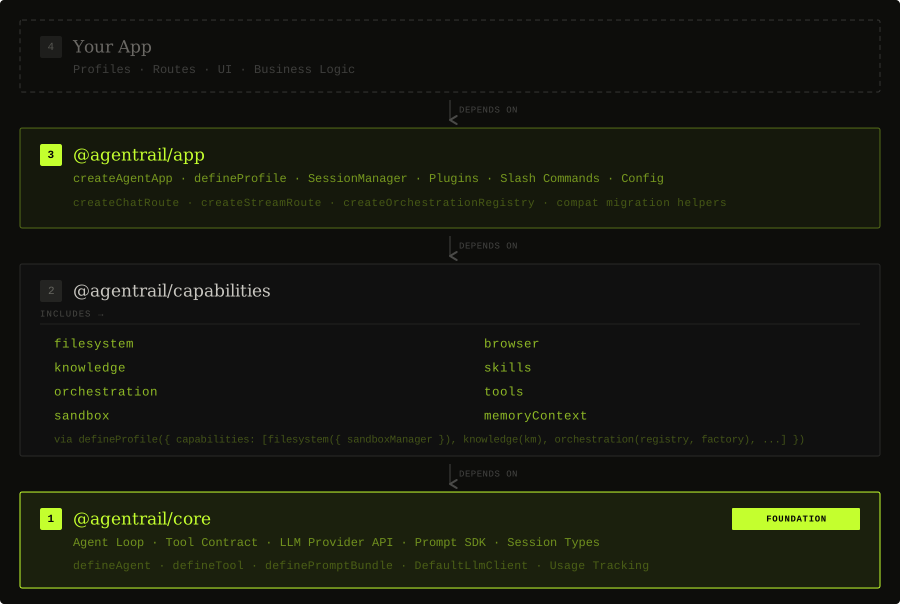
Two design axes govern the stack:
Vertical (dependency direction) — each layer depends on the one below it, never the reverse: core ← capabilities ← app. Your app depends on the framework; the framework does not depend on your app.
Horizontal (composition) — @agentrail/app is wide, not just tall. It composes @agentrail/capabilities (sandbox, knowledge, skills, orchestration, tools) and @agentrail/core (runtime, prompts, session types) into a hosted request lifecycle.
Layer Map
1. @agentrail/core
The execution foundation. Defines agents, tool contracts (defineTool), the LLM provider abstraction, the agent loop, message types, prompt SDK, session type contracts, and usage tracking.
Everything else in the framework builds on this layer. It has no knowledge of HTTP, sessions, or host lifecycles.
2. @agentrail/capabilities
Domain-specific building blocks that extend the agent's surface area. Provides:
- Filesystem and browser tools (sandboxed execution via Docker)
- Knowledge-base indexing and retrieval
- Skill discovery and execution
- Multi-agent orchestration (sub-agents, mailboxing, waits, recovery)
- General-purpose tools (web search, ask-user, todo writing, etc.)
Capabilities are independently usable and injected through profiles via defineProfile({ capabilities: [...] }).
3. @agentrail/app
The main server-side integration package. Handles:
- HTTP request lifecycle via
createAgentApp(chat and stream endpoints) - Profile definition via
defineProfile - Session management (
SessionManager) - Plugin and slash-command extension model
- Typed config loading
- SSE event contracts
Start here: createAgentApp is the recommended entry point for hosted deployments.
4. Your app
Profiles, routes, UI, and business logic. This is the code you write. It uses @agentrail/app and @agentrail/core but is not part of the framework itself.
Package Reference
| Package | Layer | Purpose |
|---|---|---|
@agentrail/core | 1 | Agent loop, tool contracts, LLM providers, prompts, session types |
@agentrail/capabilities | 2 | Sandbox, knowledge, skills, orchestration, built-in tools |
@agentrail/app | 3 | createAgentApp, defineProfile, sessions, plugins, config |
@agentrail/cli | tooling | Local developer CLI (agentrail doctor, config checks, helpers) |
@agentrail/testing | tooling | Test helpers for hosted apps and runtime behavior |
@agentrail/deep-research | addon | Multi-agent deep research workflow |
@agentrail/create-agentrail-app | tooling | Project scaffold CLI |
Request Lifecycle
Here is what happens when a message arrives at a stream endpoint:
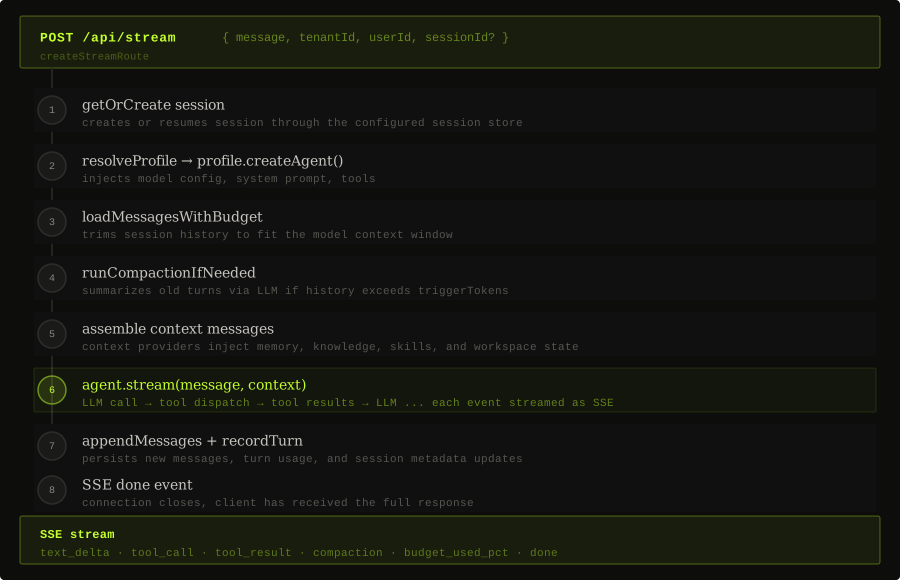
The /chat endpoint follows the same steps but buffers the full response instead of streaming.
Recommended vs Escape-Hatch APIs
One of the core design ideas in Agentrail is a deliberate split between a recommended high-level path and lower-level escape hatches.
The primary entry points are:
createAgentApp({ dataDir, profiles, ... })— the recommended way to mount both/chatand/streamendpoints in one calldefineProfile(definition)— declare profiles with agent config, capabilities, and optional per-request factory
Lower-level escape hatches from @agentrail/app/advanced (use when you need finer control):
createChatRoute(...)— mount only the/chatprimitivecreateStreamRoute(...)— mount only the/streamprimitivecreateOrchestrationRegistry(...)— per-session orchestration manager
Compatibility helpers still exist in @agentrail/app/compat, but they are migration-only APIs. Keep them out of new application code and refer to Compatibility APIs only when updating older hosts.
Start with createAgentApp + defineProfile. They are not black boxes — they are a recommended assembly of primitives that you can unwrap and replace piece by piece as your app grows.
The same principle applies throughout the framework: @agentrail/core provides execution primitives; @agentrail/capabilities provides reusable building blocks; @agentrail/app wires them into a recommended hosted path.
Recommended Development Path
Approach the framework in this order to keep complexity proportional to need:
- Read the quickstart — get a working app from the scaffold first
- Understand profiles and
@agentrail/app— this is where most application logic lives - Use
createAgentApp+defineProfile— start here before reaching for lower-level primitives - Add prompts and context providers early — they pay off quickly as apps grow
- Add capabilities and plugins where app-specific behavior appears
- Add orchestration only when the problem actually needs multi-agent work
Framework Core vs Application Code
A useful boundary for contributors:
Framework core (belongs in framework packages):
@agentrail/core,@agentrail/capabilities,@agentrail/app
Application code (belongs in your app or example projects):
- concrete prompt content, concrete profile definitions, app-local plugins, route composition, UI-specific event rendering, workflow business logic
Keeping this boundary clean is what makes Agentrail reusable as a framework rather than collapsing into a monolithic app.
Design Principles
- Stable primitives with a recommended SDK path on top.
- Dependency direction is always framework → core, never the reverse.
- Chat and stream routes share the same lifecycle concepts.
- Capability packages are independently usable and optionally composed.
- Business-domain logic stays out of framework core packages.